No Google, no YouTube? Your TV box is still saved!
Tips on how to support YouTube with the 2026 box
Bought a TV box, intended to create the core of the home theater, the results of the boot, the heart half cold - the application store can not be found in Google Play, not to mention the shadow of YouTube. This kind of box, which is called "naked machine" or "domestic special edition", is readily available in the market.
They usually install their own or third-party's app marketplace, which has all kinds of audio and video apps, but the world's largest audio and video platform is missing. Why is this so? Simply put, due to cost control and regional policy considerations, vendors choose not to pre-install Google's service framework (GMS).
What are we going to do now? Do we just leave this "half-broken" box?
Of course not! This article is to show you that even if your box is a "blank sheet of paper", you still have at least two powerful ways to make it play YouTube videos perfectly.
Survival Route One: The Ultimate Makeover for Hardcore Gamers - Manually implanted GMSorganizing plan
This is the right path for those who love challenges and are not afraid to take risks. The goal is clear:"Load" your boxGoogle Internet companyThe soul.
- What do you need?
- A computer and a USB flash drive.
- Patience and care.
- Find the Android version of your box on the web! GMS Installation Kit。
- Approximate flow (in Android) (for example):
- Turn on Permissions: Find "Security" in the box's "Settings" to allow installation of apps from unknown sources.
- migration framework: Copy the downloaded GMS installation package to the box via USB disk and follow the instructions to install it step by step. This is the most critical and error-prone step.
- Install YouTubeThe box will be "transformed" into a standard Android device after the installation. At this point, you can install the Google Play store or download the YouTube APK directly to complete the final step.
- Benefits and Risks of the Road:
- AdvantagesThe first thing you'll need is a "full-featured" box that not only allows you to watch YouTube, but also to use all the apps that require Google services.
- Risks: The operation has a certain technical threshold, failure may lead to system instability, or even the need to refresh the system.This is tantamount to performing surgery on the device and should be evaluated carefully!
Survival Route 2: Shortcuts for the Intelligent Player-- Install SmartTubeNext
If you thought the first method was too much trouble, then this is definitely the way to go. Instead of "revamping the whole system," it uses aPowerful third party Appto perfectly replace YouTube.
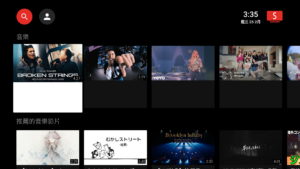
SmartTube Next is very powerful, it can make the box that doesn't support Google Framework architecture (the mainland version of the operating system) to watch Youtube and also remove ADS, it is a perfect set of playback software, so you can enjoy watching Youtube on the same time.
Support mainstream TV boxes
| Xiaomi Mi Box | Amber Box | Thousand Search Box |
| LeTV Box | TMC Magic Box |
This category in the absence of Google Frames Works well in all conditions |
It is the artifact we have mentioned many times before:SmartTubeNext。
- Why is it especially suitable for "Naked Machines"?
- No Google required Framing! This is its biggest advantage. It's a standalone app that doesn't rely on any Google services, so you can install it directly and use it.
- Functions far better than the officialAd blocking, unlocking 4K quality, background playback, and skipping sponsor clips ...... may not be supported by official apps, but it gives you all of these features.
- Better ExperienceThe interface is smooth and intuitive, especially the search and operation logic optimized for the remote control, which is even better than some official TV versions.
- Three Steps to Installation:
- Download the latest APK
You can enter our website in your box browser or use your computer/mobile phone to download the latest APK and transfer the APK file to your box via USB disk.
2. Find the file on the box and allow it to install.
- Pros and cons of this road:
- Advantages: Simple installation, low safety risk and excellent experience. Solve the biggest pain point with the smallest effort.
- DisadvantagesIt's just a YouTube client and can't replace Google Play or other apps that require Google's services.
Conclusion: Your box, your call!
It's not like there's nothing you can do with a TV box that doesn't have Google and doesn't have YouTube.
- If you are aFansTo enjoy the sense of control that technology brings, you can choose toRoute 1The first step is to transform it into the desired look.
- If you are aUtilitariansIf you just want to watch YouTube easily, quickly, and consistently, thenRoute 2SmartTubeNext is definitely the right choice for you.
Don't let the box's preconceived notions get you down. The beauty of technology is that we can always find ways to turn limitations into opportunities. Now, go ahead and try your hand at making your "blank paper" box the best it can be for video and audio!